Last November Cisco published the new Catalyst Center golden image, 2.3.7.7 that include some new features and improvements like:
- Dark Mode
- AIOps: Event Analytics, Over the air sniffer, AP power savings insights
- NetOps: Campus Automation, configuration visibility and control, 3rd party device support
- SecOps: Improved endpoint visibility, LAN automation
- DevOps: API enhancements including new APIs …and more
For all the details you can, as usual, refer to the release notes at https://www.cisco.com/c/en/us/td/docs/cloud-systems-management/network-automation-and-management/catalyst-center/2-3-7/release_notes/b_cisco_catalyst_center_237_release_notes.html
At this point i need to upgrade my Catalyst Center application :)
A complete and safe system upgrade involves many steps like:
- Verify how many upgrade steps do you need to perform starting from your current version
- Consult the compatibility matrix
- Run the validation tool or the AURA tool
- Configure the backup/restore environment and perform a recent backup
- Check the internet connection
- Create a bootable USB device with the Catalyst Center image
In this post i will discuss the first 2 points of the list, the remaining points will be discuss in future posts.
Verify how many upgrade steps do you need to perform starting from your current version
Depends on your Catalyst Center current version you could probably run different upgrade step. Cisco will help us with a document that explain us how many step we need to perform and the specific target version for each step.
As you can see at this link (https://www.cisco.com/c/en/us/td/docs/cloud-systems-management/network-automation-and-management/dna-center/upgrade/b_cisco_catalyst_center_upgrade_guide/m_upgrade_to_cisco_dna_center_2_3_7_x.html#upgrade-from-222x-to-237x) you can find all the details about every upgrade steps.
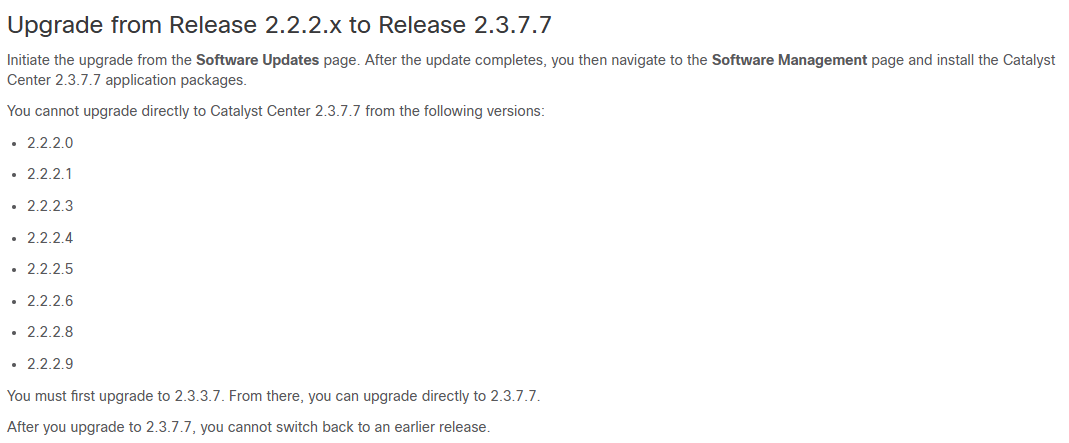
Let’s assume we are running a very old image (2.2.2.x) we will need to firstly upgrade to 2.3.3.7 version and then to our final destination 2.3.7.7:
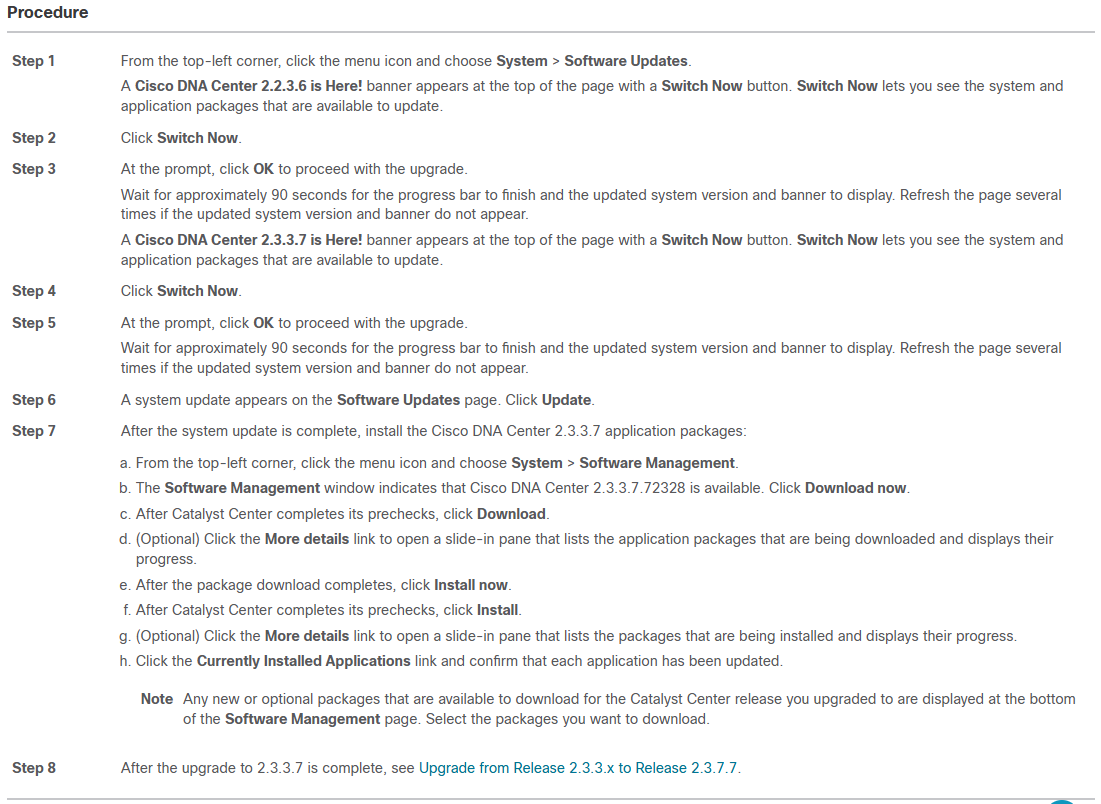
This document also provide you all the details about how to perform the upgrade:
Consult the compatibility matrix
After you retrieve your order list you need to check if your network devices already runs a software version compatible with the new Catalyst Center version.
You can check this at https://www.cisco.com/c/dam/en/us/td/docs/Website/enterprise/catalyst_center_compatibility_matrix/index-sda.html choosing from SD Access or Non-Fabric and then selecting Application, Target Release and device Role:
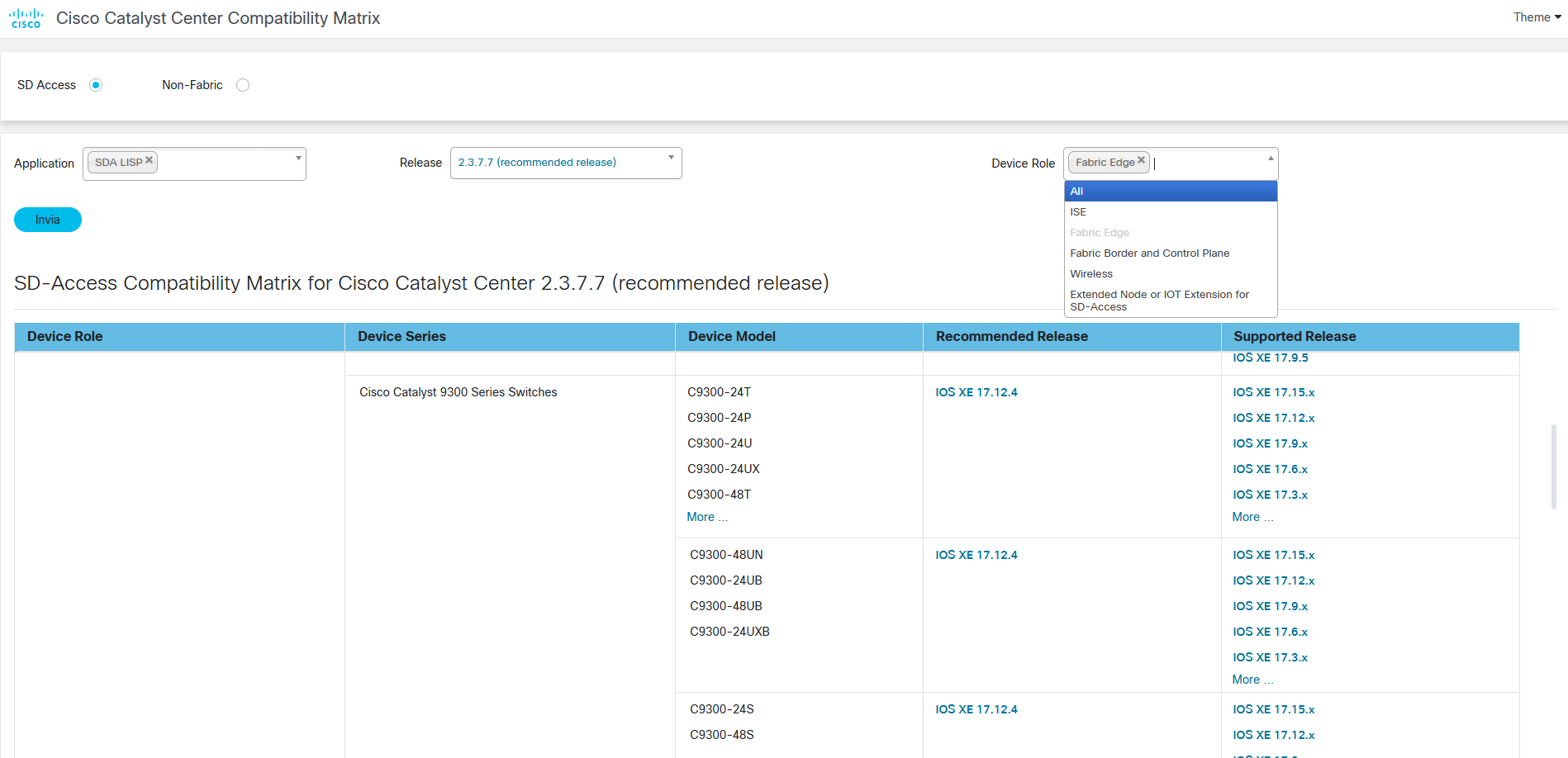
As you can see, for each Device role you can check if a specific software release of a Switch family is compatible with the Catalyst Center target release.